My School app

Ongoing · Interaction Design · UI/UX Design · Development

My School is an all-in-one academic planner designed to help students manage schedules, assignments, exams, and wellbeing across Apple platforms. Independently designed, developed, and published on the App Store.

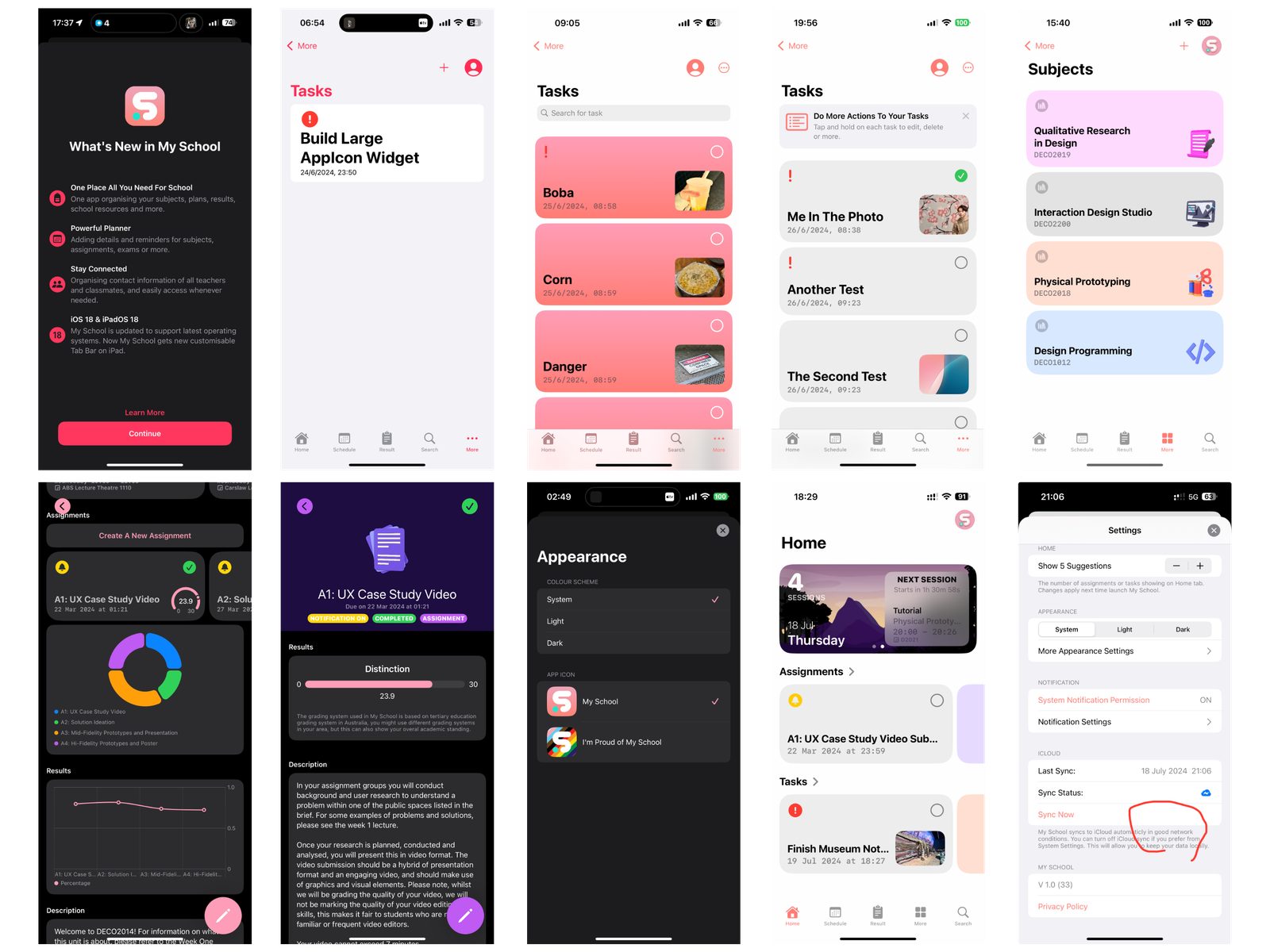
My School app running on an iPhone and a Mac.

Context

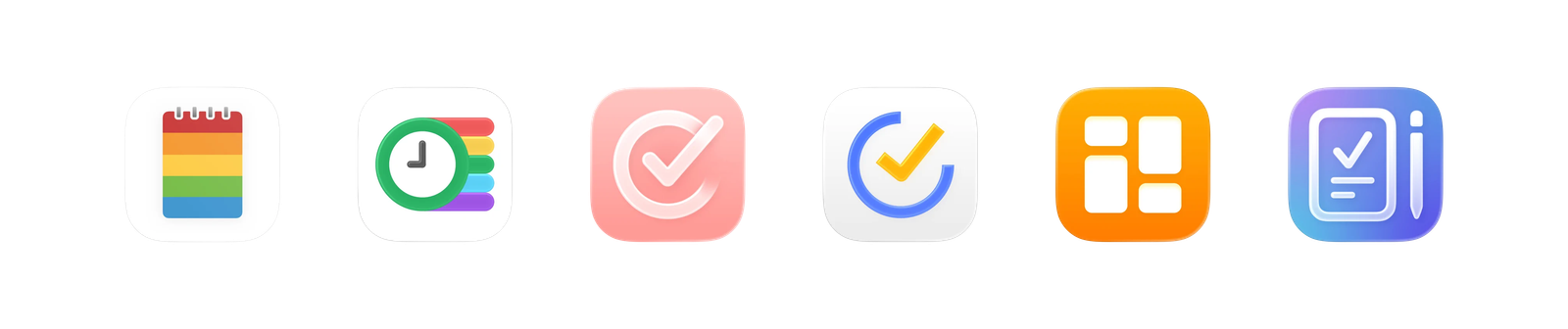
As a student, I struggled to find a single app that could effectively manage timetables, assessments, and everyday academic planning. Existing apps tended to focus on only one part of the student experience, requiring users to switch between multiple platforms. Conversations with 20 fellow students revealed that more than three quarters relied on at least two apps, highlighting an opportunity to create a more unified academic companion.

Some existing planning/timetable apps (from left to right): Class Timetable, Smart Timetable, Structured, TickTick, My Timetable, School Assistant.

My Role

I led every stage of My School, from identifying the opportunity and designing the user experience to development, App Store release, and continuous iteration. As an independent project, every design and product decision was my responsibility.

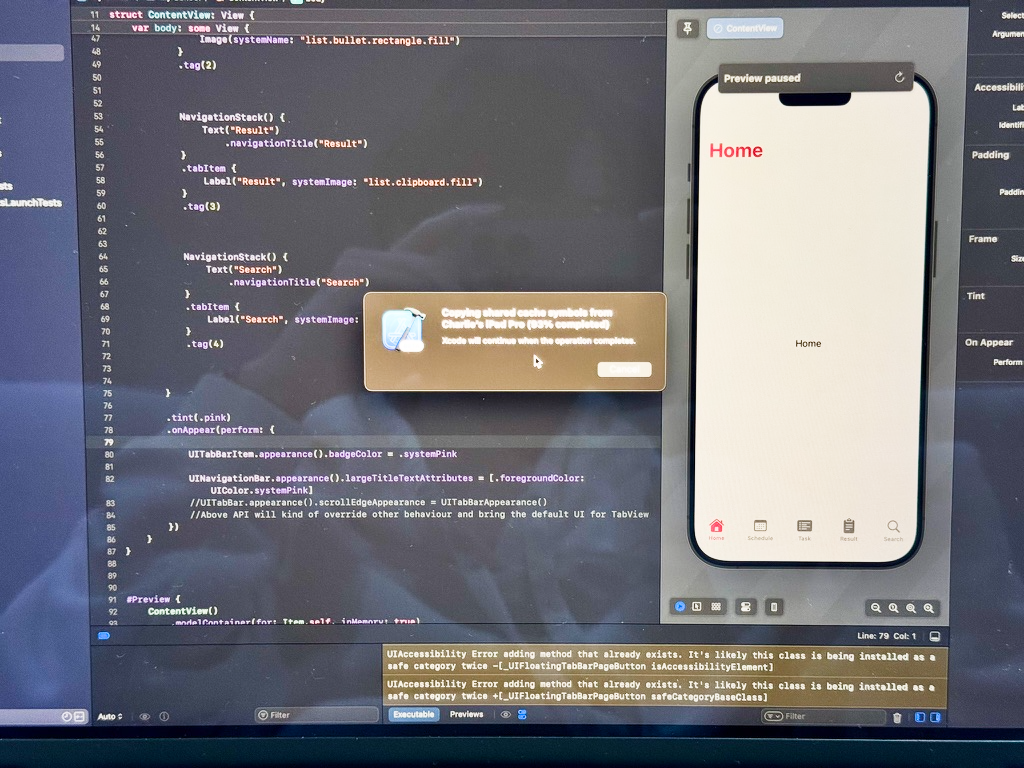
Early stage of development: SwiftUI was selected as the foundation for development, enabling rapid interface iteration and native support across Apple platforms.
Early interface concepts were prototyped directly in SwiftUI and tested on-device, allowing design and implementation to evolve together.
App Store Connect User page view showing me (Rongzhi) as the only designer, developer, publisher, and manager of My School app.
Early stage of development: SwiftUI was selected as the foundation for development, enabling rapid interface iteration and native support across Apple platforms. Early interface concepts were prototyped directly in SwiftUI and tested on-device, allowing design and implementation to evolve together. App Store Connect User page view showing me (Rongzhi) as the only designer, developer, publisher, and manager of My School app.

Design Philosophy

Rather than designing another timetable or task manager, My School was designed as a complete academic companion. The experience connects planning classes, managing assessments, tracking academic performance, supporting mental wellbeing, and accessing information wherever it is needed.

The design was guided by four principles:

• One Academic Journey — Treat planning, learning, performance, and wellbeing as connected parts of the same experience.

• Context Before Features — Present information when it is most relevant instead of expecting students to search for it.

• Designed Around Students — Adapt to different learning environments, study habits, and personal workflows.

• Native by Design — Leverage the strengths of every Apple platform while maintaining a familiar and consistent experience.

Designing the Experience

My School was designed around students' everyday academic workflows rather than individual features. Instead of expecting students to search for functionality, the experience surfaces the right information and tools at the right time, allowing them to focus on learning rather than managing multiple apps or navigating complex interfaces.

Four connected experiences—Home, Schedule, Wellbeing, and Subjects—work together to create a unified academic workflow rather than a collection of individual features.

Information Architecture

Academic planning involves far more than timetables and assignments. As the product grew, features were organised into clear groups to help students discover functionality naturally without overwhelming navigation.

My School builds on familiar Apple navigation patterns across platforms. Compact devices use a tab bar for quick access to core destinations, while iPad and Mac use a sidebar to support deeper organisation and more complex workflows. This keeps navigation familiar while making better use of each device.

Navigation adapts to each platform while maintaining a consistent interaction model throughout the Apple ecosystem.
Three core interaction patterns work together to reduce navigation effort: contextual actions through the top bar, quick access via the tab bar, and a dedicated Search hub for discovering every feature.
Navigation adapts to each platform while maintaining a consistent interaction model throughout the Apple ecosystem. Three core interaction patterns work together to reduce navigation effort: contextual actions through the top bar, quick access via the tab bar, and a dedicated Search hub for discovering every feature.

Home Experience

The Home screen was designed around a simple question: “What do students need to know right now?” Rather than presenting every feature equally, it prioritises the most relevant information for the current moment, including upcoming classes, deadlines, travel time, weather, wellbeing reminders, and personalised insights.

Smart Brief and contextual shortcuts proactively surface relevant information, reducing the need to move between different parts of the app while keeping the Home experience focused and uncluttered.

Smart Brief brings together schedules, upcoming deadlines, wellbeing reminders, and personalised insights into a single contextual overview, helping students quickly understand what matters most.
Contextual shortcuts surface frequently used information such as schedules, transport, weather, wellbeing, and AI-powered summaries, reducing the need to navigate throughout the app.
Smart Brief brings together schedules, upcoming deadlines, wellbeing reminders, and personalised insights into a single contextual overview, helping students quickly understand what matters most. Contextual shortcuts surface frequently used information such as schedules, transport, weather, wellbeing, and AI-powered summaries, reducing the need to navigate throughout the app.

Wellbeing

Rather than treating wellbeing as separate from academic planning, My School integrates reflection into students' everyday workflows. Records can be linked to subjects, assignments, and exams, helping students understand how their studies influence their emotional state and recognise patterns through personalised insights over time.

Wellbeing is integrated directly into the academic planning experience, bringing together emotional tracking, educational resources, and personalised insights within a single workspace.
Students can record how they feel in the context of individual academic tasks, helping transform isolated emotions into meaningful patterns and personalised wellbeing insights.
Wellbeing is integrated directly into the academic planning experience, bringing together emotional tracking, educational resources, and personalised insights within a single workspace. Students can record how they feel in the context of individual academic tasks, helping transform isolated emotions into meaningful patterns and personalised wellbeing insights.

Cross-Platform Experience

While early versions of My School explored unique interfaces for each platform, the product gradually evolved towards a more unified design language. Today, every version shares a consistent visual identity and interaction model while adapting to the capabilities of each device.

Platform-specific adaptations ensure that every experience feels familiar without becoming identical. Larger devices support richer workflows through multiple windows, hover interactions, keyboard shortcuts, and menu commands, while other platforms introduce interactions tailored to their form factor and capabilities.

On iPad, My School embraces desktop-class productivity through multiple windows, allowing students to reference course information while managing schedules, assignments, and other academic tasks.
Native support for Handoff allows students to transition naturally between iPhone, iPad, and Mac without interrupting their workflow.
The iPad experience extends beyond a larger screen, introducing desktop-class interactions such as menu commands, keyboard shortcuts, and a persistent sidebar.
On iPad, My School embraces desktop-class productivity through multiple windows, allowing students to reference course information while managing schedules, assignments, and other academic tasks. Native support for Handoff allows students to transition naturally between iPhone, iPad, and Mac without interrupting their workflow. The iPad experience extends beyond a larger screen, introducing desktop-class interactions such as menu commands, keyboard shortcuts, and a persistent sidebar.

Beyond the App

My School extends beyond the traditional app experience by bringing important information directly into the system. Rather than requiring students to repeatedly open the app, key information remains accessible through Live Activities, widgets, Spotlight Search, Siri, and Apple Shortcuts. These integrations reduce friction, support everyday workflows, and ensure that relevant information is always available at the right moment.

My School extends beyond the main app through system-level features such as Live Activities, widgets, and Spotlight Search, allowing students to access relevant information without interrupting their workflow.
Deep integration with Siri and Apple Shortcuts enables students to quickly access subjects, assignments, and common actions using natural language and system automation.
My School extends beyond the main app through system-level features such as Live Activities, widgets, and Spotlight Search, allowing students to access relevant information without interrupting their workflow. Deep integration with Siri and Apple Shortcuts enables students to quickly access subjects, assignments, and common actions using natural language and system automation.

Product Evolution

Since its initial release, My School has evolved through continuous iteration, with each update introducing new features, usability improvements, and refinements informed by everyday use and user feedback.

Early versions changed significantly as new workflows emerged and usability issues became apparent. Each iteration refined navigation, expanded functionality, and strengthened consistency across platforms while preserving the core vision of a unified academic companion. My School continues to evolve as new needs and opportunities emerge.

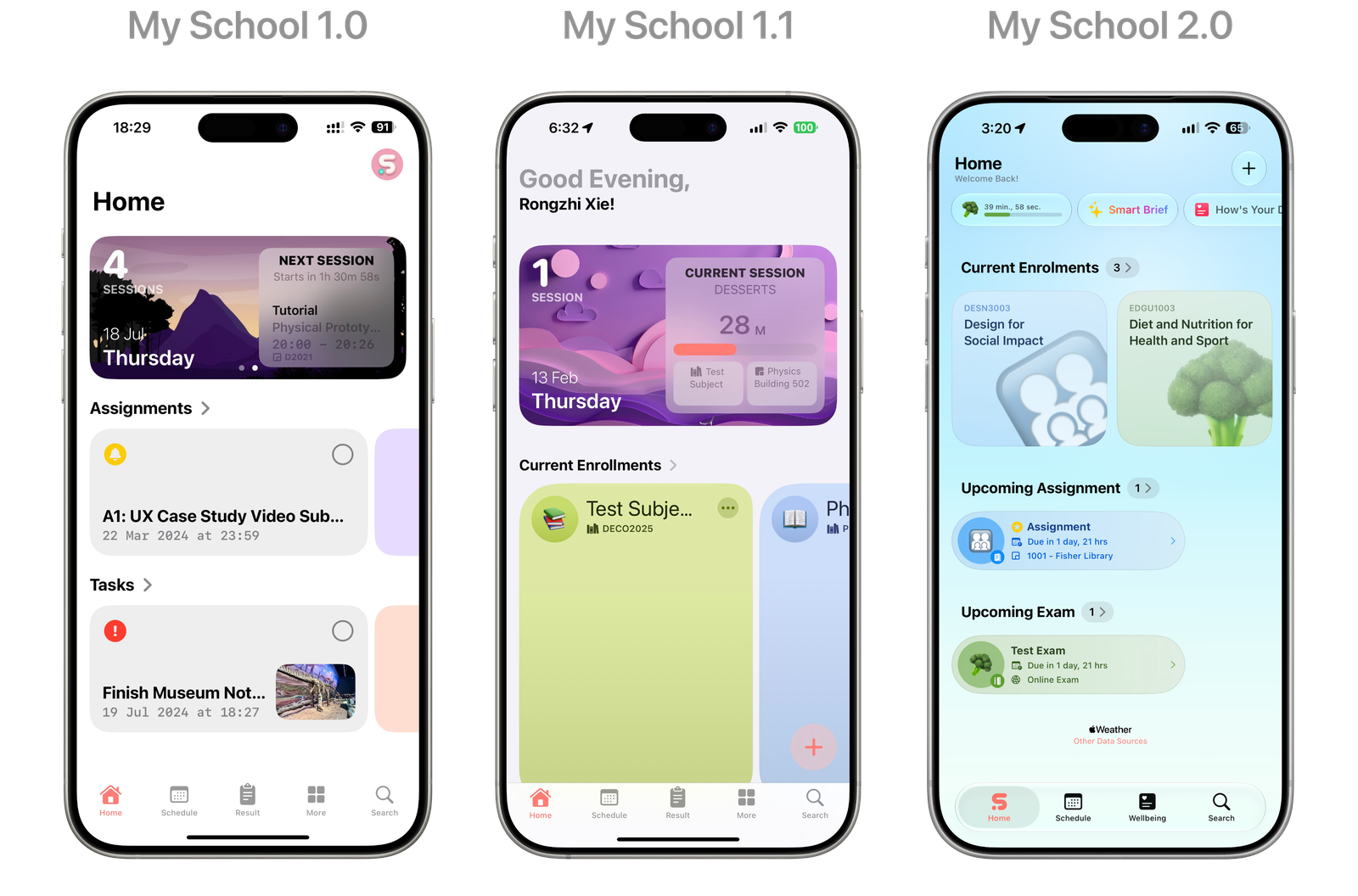
The Home experience has evolved through multiple iterations, with each release refining information hierarchy, surfacing more relevant content, and reducing visual complexity based on real-world use and user feedback.
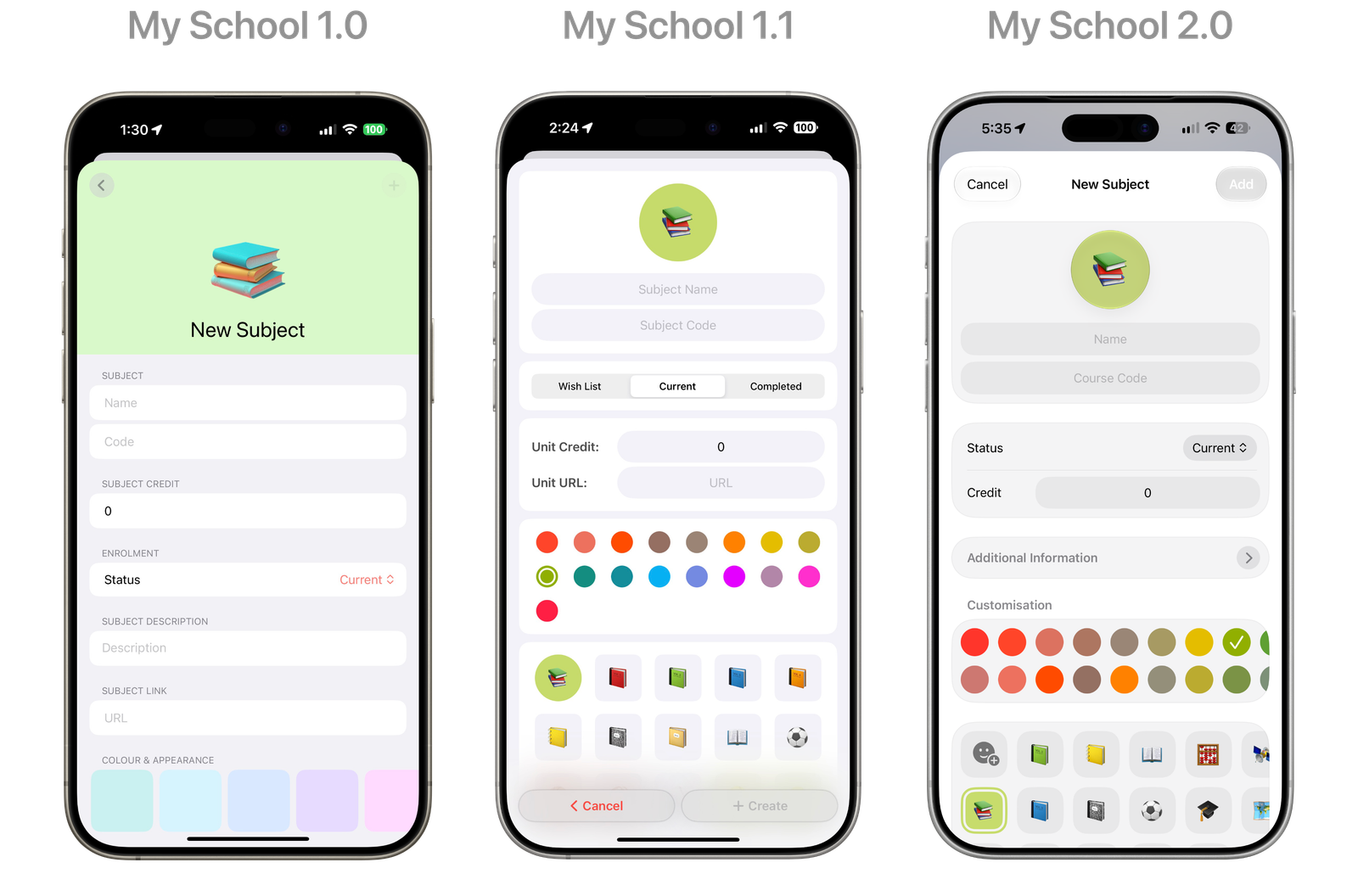
Creating a new subject became progressively more streamlined, reducing visual complexity while introducing richer customisation options without overwhelming first-time users.
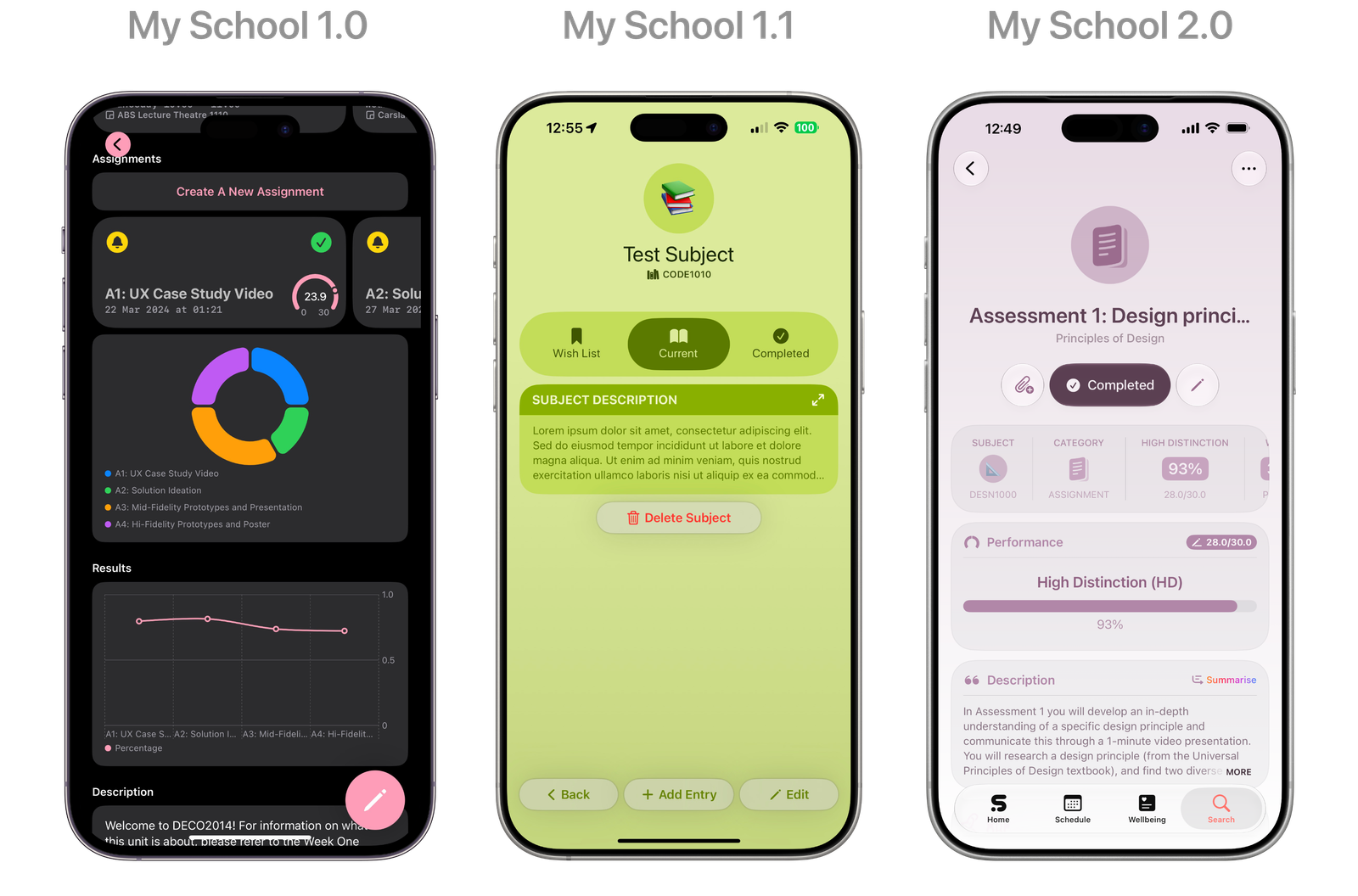
The detail view evolved from presenting information in separate sections to a richer, more structured workspace that brings performance, coursework, sessions, and resources together in a single, organised view.
The Home experience has evolved through multiple iterations, with each release refining information hierarchy, surfacing more relevant content, and reducing visual complexity based on real-world use and user feedback. Creating a new subject became progressively more streamlined, reducing visual complexity while introducing richer customisation options without overwhelming first-time users. The detail view evolved from presenting information in separate sections to a richer, more structured workspace that brings performance, coursework, sessions, and resources together in a single, organised view.

User Feedback

Since its App Store release, My School has received feedback from students across different countries, highlighting its interface, breadth of academic tools, and usefulness for everyday planning. This feedback continues to inform product decisions, helping prioritise improvements and shape future updates.

Positive App Store reviews from students around the world continue to shape the evolution of My School, informing usability improvements and future features.